













Technology • Fashion & Lifestyle

How to Cancel Bumble Boost subscription?

vegetarianism and depression
While Bumble Boost is one of the excellent features, there are cases you are looking to cancel Bumble Boost subscription. If you are wondering how to cancel Bumble Boost subscription, the tips here make it possible with ease.

If you are like us, you will find the concept of paying for free dating apps such as Bumble and Tinder quite annoying and a crazy thing to do. But then, the premium features offered by the premium version of dating apps can indeed be something you would find quite impressive.

Bumble Boost is one of the unique concepts and has been something that most of the Bumble users find a rewarding experience. However, there are situations you would want to cancel Bumble Boost subscription for one or the other reason. While you are trying to find how to cancel Bumble Boost subscription, it may be worthwhile to check out what Bumble Boost is and what features does it offer you.

Also read – Is Bumble BFF Safe? This Bumble BFF app review should help you decide

What is Bumble Boost?

Bumble Boost is one of the prime features or the deluxe features offered by Bumble. It is a premium service and provides you access to a few of the features that are not available on the free version of the dating app.
vegetarianism and depression

Some of the features offered by Bumble Boost can include

  • See everyone who swiped right on you.
  • Rematch with expired connections.
  • Extend your matches by 24 hours.
  • Search with unlimited filters.
  • Unlimited swiping.

How to cancel Bumble Boost subscription?

Depending on which device you are on, there are several ways you can cancel your Bumble Boost subscription.

How to cancel Bumble Boost subscription on an Android?

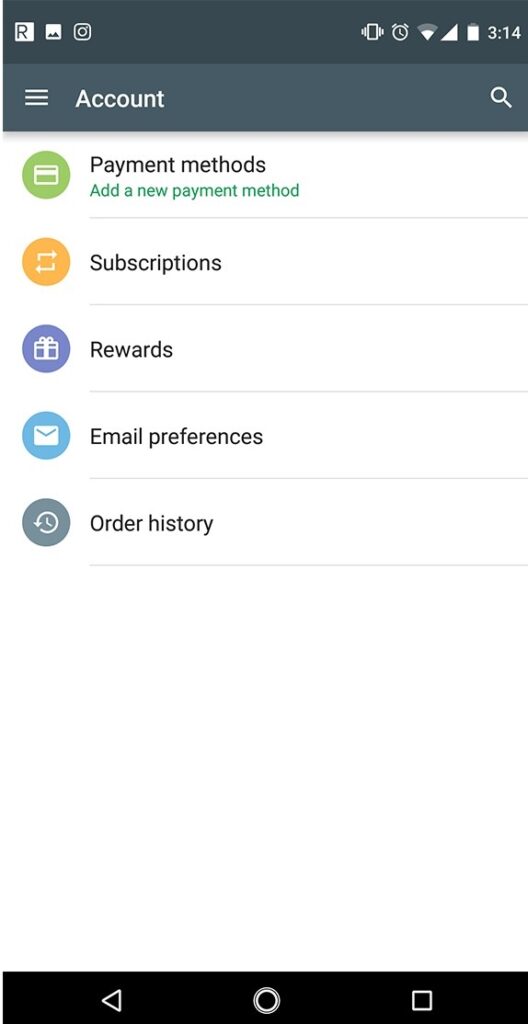
If you are on an Android device, you will need to cancel Bumble Boost subscription through your Google Play Store account. This is by assuming that you have subscribed to Bumble Boost through Google Play Store.

Here are the steps you can follow –
vegetarianism and depression

  • Go to Play Store on your Android device.
  • Select your account. If you have configured only one Google Account, you can skip this step.
  • Tap on the hamburger menu on the top left to go into the Play Store menu.
  • On the Sidebar menu, tap on Subscriptions.
  • Tap on the subscription you want to cancel.
  • Click Manage and then cancel your subscription.

This will cancel your subscription.

If you have subscribed using your credit card, you can follow the steps here below –

  • Launch your Bumble app on your Android.
  • Tap on your profile icon
  • Tap on Manage Payment Account option
  • Tap on Cancel Subscription

How to cancel Bumble Boost on iOS?

If you are on iOS, you can cancel Bumble Boost subscription through Apple ID.

Here are the steps on how to cancel Bumble Boost on iOS –

  • Go to your iOS settings
  • Tap on iTunes and App Store
  • Tap on your Apple ID. You should locate it at the top of the screen
  • Tap on View Apple ID. You may need to sign in to your account.
  • Tap on Subscriptions
  • Tap on the subscription you want to cancel
  • Tap on Cancel Subscription.

That does it. You have successfully canceled your subscriptions to Bumble Boost.

How to cancel Bumble Boost subscription – A few factors you should note!

If you have decided to cancel Bumble Boost subscription, there are a few factors you need to take care of.

  • Bumble Refund Policy – Bumble terms and conditions specifically mention that all the purchases and payments made on Bumble are non-refundable. That would mean you will need to cancel your Bumble Boost subscription 24 hours before your current subscription expires. Once the subscription renews, the amount charged will not be refunded.
  • Renewals will be for the original time period – That means if you have subscribed for 6 months, the renewals will be for 6 months. That should make it quite essential to cancel the subscription well before the existing subscription expires.

Moreover, there is no option to transfer the subscription to another account. If you are looking to cancel the subscription and delete the account, it should be noticed that transferring your Bumble Boost subscription will only be done by contacting customer care.

Is Bumble Boost worth it?

Bumble Boost is a good option for those living in metropolitans and big cities. You can get a lot of matches. Using Bumble Boost can help eliminate the need for swiping. You can concentrate only on those profiles that have liked you. It can also be an excellent option for those of you who do not check the app on a regular basis.

However, if you live in small cities, there may not be many people on the app, and using a Bumble Boost subscription may be worthless. Moreover, if you are not getting good profile matches on the app on your free account, it may not be the right one to go with the Bumble Boost subscription.

About the author

Timmappa Kamat

Add Comment

Click here to post a comment

This site uses Akismet to reduce spam. Learn how your comment data is processed.

Get Better Deals on Hosting

Get Better deals with HawkHost

Calendar

October 2026
S M T W T F S
 123
45678910
11121314151617
18192021222324
25262728293031

RSS feed: Meks Blog Meks Blog

  • How Adding Slack Bot Boosted Our Culture of Appreciation July 3, 2024
    Sweet Kudos is a Slack bot that enhances employee recognition, rewards, and celebrations within your team. It empowers team members to express gratitude and appreciation effortlessly by giving virtual Kudos. The post How Adding Slack Bot Boosted Our Culture of Appreciation appeared first on Meks.
    Dusan Milovanovic
  • 10 Best Knowledge Base & Wiki WordPress Themes 2021 September 15, 2021
    Running a successful online business requires an exceptional WordPress knowledge base theme that organizes documentation and helps customers. Customization options, intuitive navigation, unique layouts, and fast responsiveness are just some of the features you need. The following 10 WordPress wiki themes represent the best options for 2021 and beyond. Explore the full range to determine […]
    Dusan Milovanovic
  • How to increase WordPress Memory Limit (quick fixes) June 16, 2021
    Here is a post about how to increase the memory limit in WordPress. Allowed memory size exhausted error message showed up in your WordPress installation? No worries – this is one of the most common errors in WordPress. You can apply an easy fix by increasing the memory limit in your PHP. Table of Contents […]
    Dusan Milovanovic
  • How to use (and why) WordPress sitemap plugin March 1, 2021
    Did you know that by knowing how to use the WordPress sitemap plugin you can significantly improve your site’s visibility and traffic? Although it isn’t mandatory to have a sitemap on your site, having one significantly improves the site’s quality, crawlability and indexing. All this is important for better optimization, which is why we wanted […]
    Ivana Cirkovic
  • 22 free and premium podcast software for your show [2021 edition] January 18, 2021
    You’re determined to start or improve your podcast but don’t know which podcast software to use to really make it stand out? We’ve got you! #podcasting Top 22 free and premium podcast software for your show #WordPressTips #podcasting The post 22 free and premium podcast software for your show [2021 edition] appeared first on Meks.
    Ivana Cirkovic
  • Digital storytelling with WordPress – an all-in-one guide to make your web stories pop! November 23, 2020
    Wondering how to improve digital storytelling with WordPress and build more awareness and exposure of your business? Let our guide lead the way. The post Digital storytelling with WordPress – an all-in-one guide to make your web stories pop! appeared first on Meks.
    Ivana Cirkovic
  • How to use WordPress autoposting plugin to improve your visibility and SEO? September 10, 2020
    Did you know you can use the WordPress autoposting plugin for your content efforts and improve not only your time management but your business and visibility as well? The post How to use WordPress autoposting plugin to improve your visibility and SEO? appeared first on Meks.
    Ivana Cirkovic
  • How to create a personal branding site? Step-by-step DIY guide August 15, 2020
    Looking for ways and means to create a personal branding site? Well, look no further ’cause we’re giving away all the how-to’s to do it yourselves! The post How to create a personal branding site? Step-by-step DIY guide appeared first on Meks.
    Ivana Cirkovic
  • Top 15 WordPress content plugins and tools to improve your visibility and rankings July 16, 2020
    Let’s take a look at some of the must-have WordPress content plugins and tools to use to improve both your UX and rankings. The post Top 15 WordPress content plugins and tools to improve your visibility and rankings appeared first on Meks.
    Ivana Cirkovic
  • WCEU 2020 recap – key takeaways from the biggest online WordPress conference June 9, 2020
    Missed WCEU 2020 and all the exciting stuff from there? Here are all the key takeaways and main points to remember so, take notes! The post WCEU 2020 recap – key takeaways from the biggest online WordPress conference appeared first on Meks.
    Ivana Cirkovic