






























Archiving your mail in Gmail can be one of the excellent options in more ways than one, but there are times when you want to unarchive Gmail and get your mails back into your Inbox. However, the lack of a separate folder for Archived emails in Gmail is one of the serious issues that has made it quite difficult to work with the archived mails. Let us learn how to unarchive Gmail message instantly.

You might have archived a mail accidentally or by error, and now want to find it back. Gmail has no special folder designed specifically for checking the archive mails in the Gmail portal or even on the app. If the mail is quite important, and you do not know how to find and unarchive it, you might as well lose access to the particular mail completely.
What Happens when you archive Emails in Gmail?
Archiving an email is the right way to get unwanted emails without the need to delete them. There may be instances when you have a few unimportant emails in your inbox. You do not want to delete them, but just want to get them off from your inbox. This is where archiving mail in Gmail can be useful.
When you archive a mail, it does not get deleted. The mail will simply be removed from your inbox and is moved to a dedicated folder. Do note that the email will stay in your Gmail account and will not be deleted. You will be able to get access to the archived email from your account and decide to either delete it or get it back into your inbox.
How to unarchive Gmail message instantly?
The major issue with the task involved in how to unarchive in Gmail is that Gmail does not have a special or dedicated folder for archived emails. While the archived emails are saved in a separate folder, the folder itself is not visible on the app or web portal interface. That is why you will find it rather difficult to find ways on how to unarchive GMail instantly.
Method 1 – Unarchive Gmail message on the desktop portal
If you are desktop or laptop and accessing the desktop version of your Gmail application, you may find it rather simple and easy to unarchive your Gmail. You simply need to find the right tab and you will be in for finding the best options to unarchive emails in Gmail.
Step 1 –
Launch your Gmail application on your web portal. You can simply type in mail.google.com in the address bar and you will be signed in to your Gmail account. Sign in to your account if you haven’t already. If you have signed in before, you will be signed in automatically.
Step 2 –
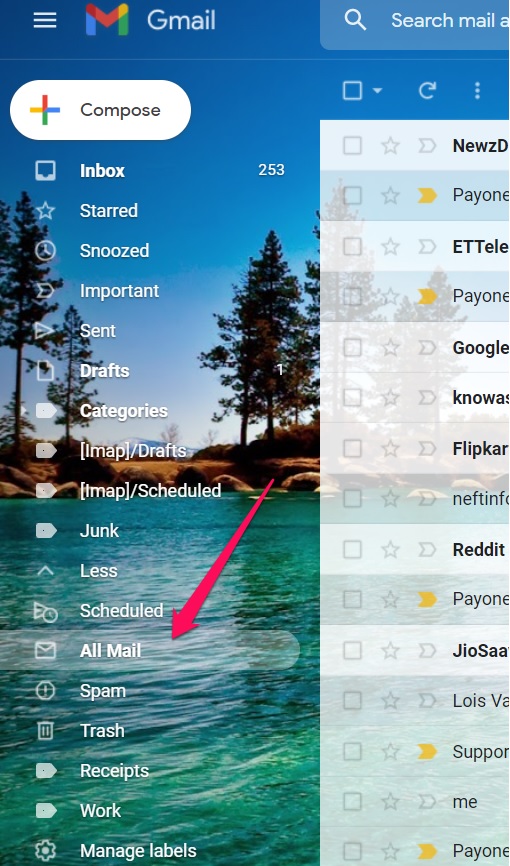
Click on the All Mail option on the left side pane. If you do not find it, you can click on the More button to get access to your All Mail section.
Step 3 –
You should now be able to find your archived email. If you know the name of the sender, you will be able to get access to it. Once you find it, simply right-click on it and choose to send it to your Inbox. That simply does it.
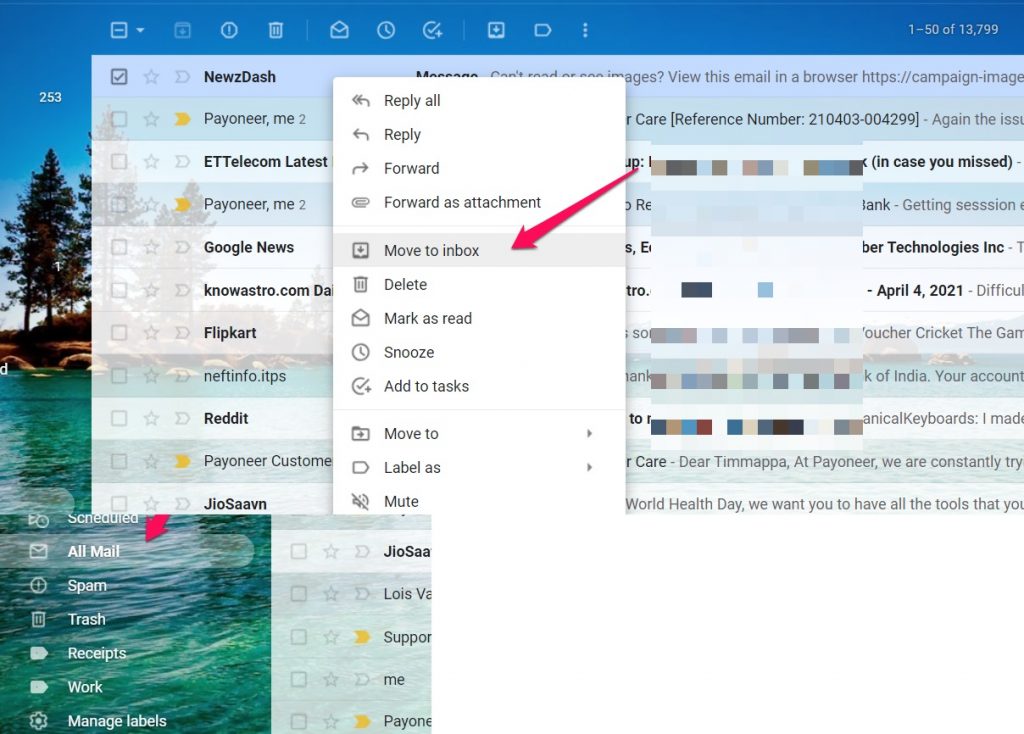
That does it. Your archived email will now be unarchived and moved to your inbox.
Method 2 – How to unarchive Gmail on an Android device
Unarchiving mail on Gmail can be quite simple and easy to go with and involves the same steps as in the case of the Desktop version. You need to access the All Mail section and you will find the exact same options as on the desktop application.
Step 1 –
Launch the Gmail application on your Android device. Ensure that you are signed in to the service. If you are already signed in, you may ignore the step.
Step 2 –
Launch Menu by tapping on the three-dot menu on the top left. This will provide you access to several folders and settings on your Gmail app.
Step 3 –
Choose the mail you want to access and unarchive and open it. You should be able to open it as you would open any other email.
Step 4 –
Click on the three-dot menu on the right side. From the context menu, click on Move to inbox.
That does it. Your archive Gmail message will be unarchived.
How to Archive in Gmail?
Now that we have learned how to unarchive mail in GMail on your devices, it may also be a good idea to understand how to archive an email. In fact, archiving the emails should be one of the simplest and easiest means to clear out the clutter in your inbox.
Irrespective of whether you are on the desktop version or the mobile app version of Gmail, you will be able to archive mail in Gmail with the same methods.
On a desktop version, right-click on the mail you want to achieve and click on Archive from the context menu.
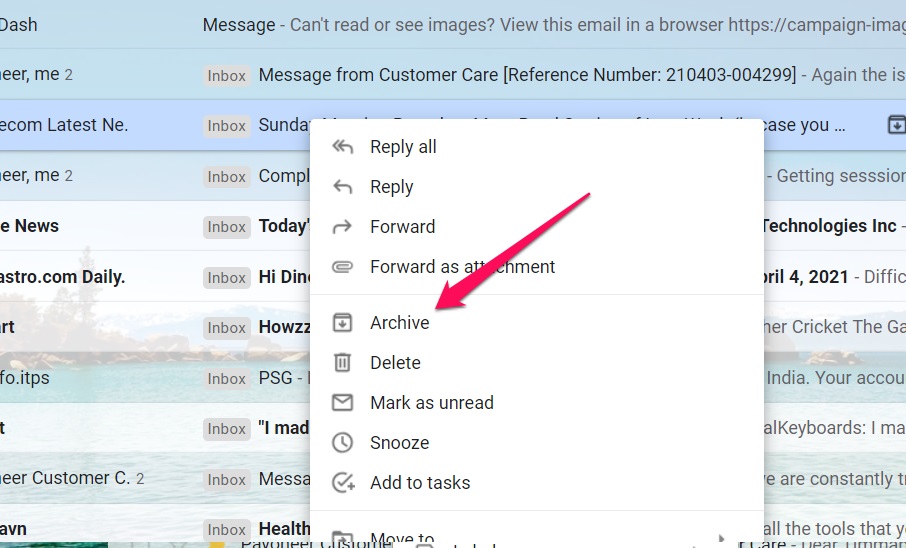
You will also be able to archive your mail by opening the message and then click the icon for Archive.

In case you are on an Android device, you can simply swipe the message to the left. This will automatically archive your email in Gmail.
Archiving mail in Gmail can be an excellent option to help you save space on your Gmail account. It can also be practical enough in providing you with a cleaner and clutter-free inbox.
Well, archiving is a great option in improving and making your inbox extremely clutter-free, and easy to use. It can also be a good option for helping you free up your inbox from unwanted emails without the need to delete the emails.


Add Comment